Direct answer: GAtrends (gatrends.com) is a trend radar. You type in the games, topics or technologies you care about, it compares seven live sources against what is normal for each of them, and it alerts you in Telegram, in Claude or ChatGPT, through a webhook or through an API when something moves. It is built by the same person who runs Oggo, so this page is an owner's review: we use it ourselves, we know its limits, and we list them below.
The timing is not an accident. GTA VI arrives on November 19, 2026, exactly one week after this article. Searches, news volume and Wikipedia views for the game are already well above their usual level, and every site that covers games is about to compete for the same attention. A radar that tells you what is rising an hour before the headlines catch up is worth more this week than it will be at almost any other time.
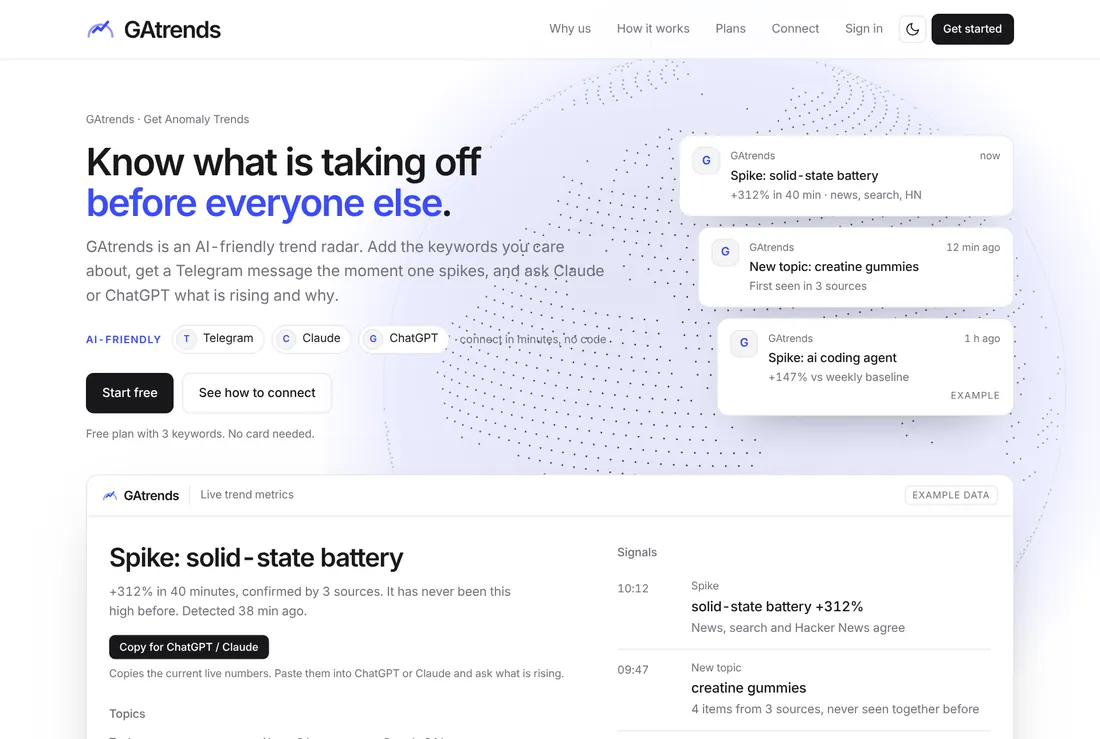
Key takeaways
- GAtrends reads seven sources: Google News, Hacker News, Wikipedia, Steam, Google Trends, GitHub and Product Hunt.
- Every keyword has a status: Learning, Normal, Rising or Spike. Nothing is announced until the tool knows what normal looks like.
- Alerts go to Telegram on every plan. Claude and ChatGPT access starts on Pro, the webhook and the REST API on Business.
- The Free plan costs nothing and tracks three keywords, so you can test it on a single game before paying anything.
- Paid plans cost from $12 a month. There is a 14-day money-back guarantee on the first payment, and Paddle is the Merchant of Record.
- It is a radar, not an oracle. It tells you that something is moving and shows the headlines behind the move; it does not tell you what to publish.
Why a gaming trend radar exists at all
Anyone who writes about games has lived the same morning. You open your feed, a topic is already everywhere, and the first dozen articles are live. You spent the previous two hours on something that nobody searches for. The information needed to avoid that morning is public: players pile into a game on Steam, Wikipedia pages get hit by a spike of curious readers, a story climbs the front page of Hacker News, and Google starts showing a new term in its trending list. The problem is that these signals live in seven different places, each with its own rhythm and its own idea of what counts as unusual.
Looking at a single source is how people get fooled. Steam player counts rise every weekend. Wikipedia views for a famous game are never zero. A headline count that looks huge on a quiet Tuesday is ordinary on the day of a showcase. What matters is not the number itself but its distance from the usual number for that moment, and that is exactly what GAtrends calculates. It stores a baseline per keyword and per source, compares every new reading with that baseline, and only speaks when the gap is large enough to be worth your attention.
We built the first version for ourselves. Oggo runs live server lists, guides and a GTA VI hub, and we needed to know which of our pages deserved an update before search demand peaked rather than after. It turned into a product because every other site and studio we spoke to had the same problem. If you edit a gaming site, run a YouTube channel, manage a community, buy ads against game launches or simply want to be the first to know, the rest of this review is for you.
How GAtrends works in two minutes
You add keywords. A keyword is a plain name such as GTA 6, Counter-Strike 2 or Nvidia, and for games you can attach the Steam application, the Wikipedia article and an alias list so that a headline saying “Grand Theft Auto VI” counts for the keyword “GTA 6”. Checks run on a schedule that depends on the plan: headlines every hour on Free and Starter and every 15 minutes on Pro and Business, Hacker News and Steam every hour or every 30 minutes, Google Trends, GitHub and Product Hunt every 15 minutes on every plan, and Wikipedia every six hours. On every check the tool reads each source for each keyword, stores the number, and compares it with the usual number for that source.
The usual number is not an average of everything. For Steam it is the typical value for the same time of day, because a game at 4 pm and the same game at 4 am are different animals. For Wikipedia it is a nine-day baseline, refreshed every six hours. For headline counts it is the typical volume in a three-hour window. When the gap passes a threshold, the keyword changes status, and when the status becomes Spike the alert goes out.
This design has two consequences worth knowing before you sign up. First, a fresh keyword starts in Learning: the tool needs a few hours of data before it can say anything, about three hours for headline and Steam signals on Pro and Business and about ten hours on Free and Starter because of the slower check. The other sources can alert from the very first check. Second, quiet periods are respected. If a keyword has just alerted, it will not alert again about the same thing for a few hours, so your phone does not turn into a siren during a long news day.
The seven sources, one by one
Each source answers a different question, and the value of the tool comes from reading them together. The public sources page explains each one in plain language. Here is the version we would give a new colleague.
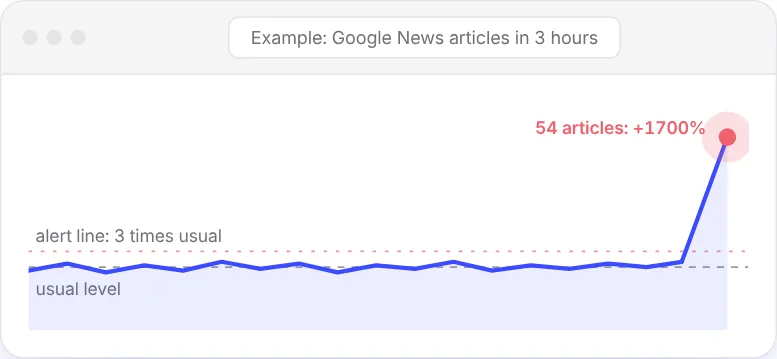
Google News: how loud is the press right now?
For every keyword the tool counts the headlines published in the last three hours and compares the count with the usual count. A keyword is Rising when the count is at least one and a half times the usual and at least two articles higher. It becomes a Spike at three times the usual and at least four articles higher. The second condition matters: going from one headline to three is a tripling, but it is not news. Headlines are also the evidence you receive, so an alert never arrives as a bare number; it comes with the stories that caused it.
When to trust it: announcements, delays, leaks, patch notes and anything else the press covers in bulk. When not to: slow burns that people discuss before the press does.
Hacker News: what are the technical readers upvoting?
Hacker News matters more than its size suggests because developers, hardware people and founders read it before they write about anything. The tool counts stories about a keyword over 24 hours, and a story that is less than six hours old and has already reached 50 points triggers its own alert. That is how you hear about a new graphics-driver exploit, an engine release or a surprising benchmark before it reaches the mainstream outlets.
Wikipedia: are curious readers arriving?
Wikipedia page views are the quietest signal and one of the most honest. People who hear a name and want to know who or what it is open the article. The tool keeps a nine-day baseline for each article and refreshes it every six hours. Rising means views are at least one and a half times the usual and at least 50 higher; Spike means at least twice the usual and at least 150 higher. A Wikipedia spike without a news spike can mean that a story is spreading through video or social media, which is exactly the kind of movement a news-only tool would miss. Note that Wikipedia publishes views per day, so the newest value is yesterday’s.
Steam: are players actually showing up?
For any game with a Steam application attached, the tool reads the number of players online and compares it with the usual number for the same time of day. Rising begins at 1.15 times the usual and 500 more players; Spike begins at 1.3× and 1,500 more. Those numbers look small, and that is deliberate, because player counts move slowly and a 30 percent lift over the usual level at that hour is a large event for a big game. Steam is also where the tool finds new releases: it announces a title the first time it enters the top sellers or the new releases list.
Google Trends: what is the public searching for?
The tool checks the trending lists for the United States and the United Kingdom. When a topic that matches one of your keywords appears, you receive a “Trending on Google” alert with the approximate number of searches today. It is a presence signal rather than a ratio, so a keyword either appears in the list or it does not, and the cool-down is one day to avoid repeats.
GitHub: which new projects are taking off?
For technology keywords the tool watches the most starred new repositories of the last seven days. This is the early warning for modding tools, emulation-adjacent frameworks (only legal, open projects are worth mentioning), engines and AI utilities. When a repository that matches your keyword is climbing, you get a “New on GitHub” alert.
Product Hunt: what just launched?
Product Hunt lists the latest launches. For gaming and tech media this is where new overlays, creator tools and AI products show up first. As with GitHub and Google Trends, the signal is presence: a launch that matches your keyword is reported once per cool-down period.
Four statuses, and why they are useful
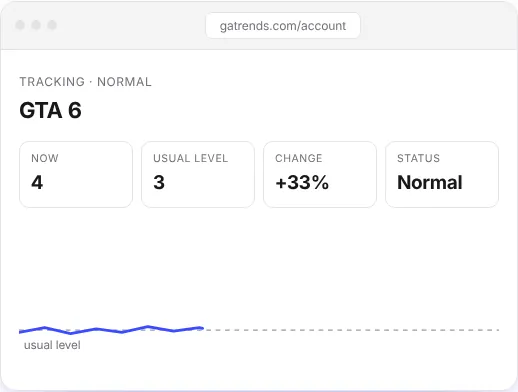
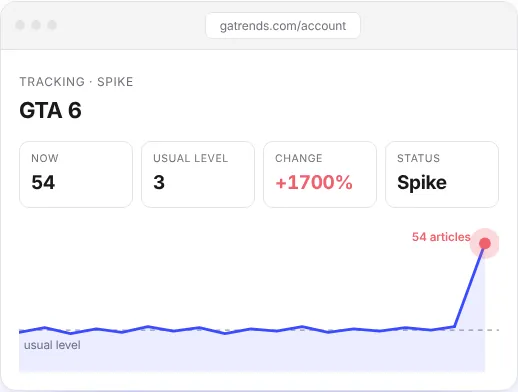
Learning means the tool has not collected enough readings to define normal. It is honest about that rather than guessing. Normal means every source sits near its usual level. Rising is the early warning: at least one source is clearly above the usual level, but not by enough to be called a spike. Spike is the alert state. The overall status of a keyword is the highest status among its sources, so one loud source is enough to bring the keyword to the top of your list.
The difference between the two screenshots below is the whole product in one picture. In the first picture the figures are close to the usual level and nothing needs to be done. In the second picture the same card shows a large jump over the usual level, and the colour, the label and the position in the list all change.
Your dashboard: keywords, tables and the alert feed
After signing in at gatrends.com/signin with an email link (there is no password to remember), you land in the account area. The top of the page lists your keywords with their overall status. Adding one takes a few seconds: type the name, and optionally add the Steam application number, the Wikipedia article title and a list of aliases. Aliases are underrated. A keyword called “GTA 6” with the aliases “GTA VI” and “Grand Theft Auto 6” catches headlines that never use your exact spelling.
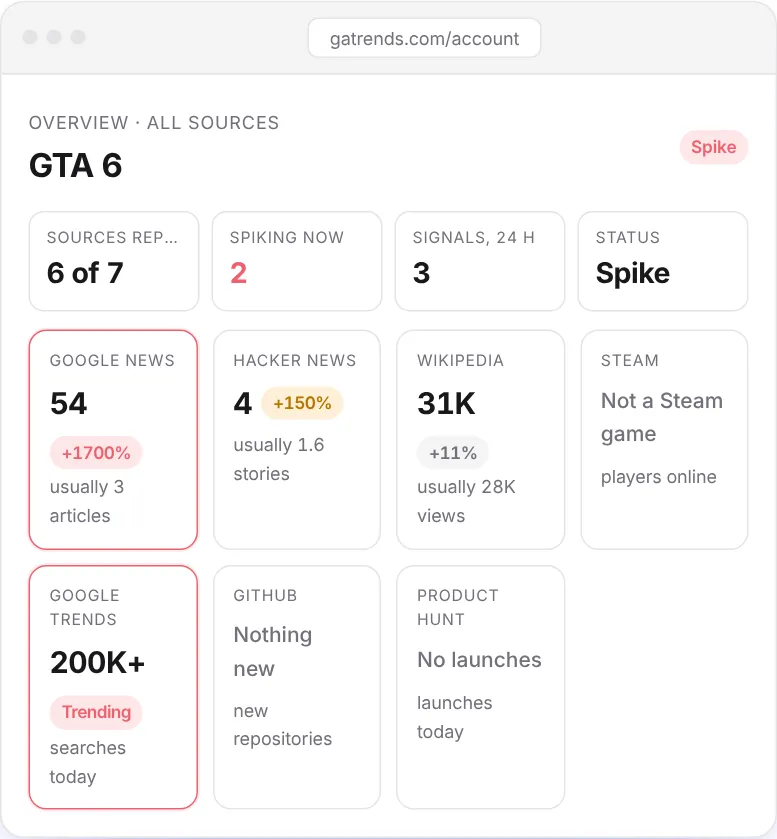
The table view is the one most people keep open. Every row is a keyword and every source has its own column with three numbers: the value now, the usual value and the percentage difference. The point of showing the usual value next to the current one is that you can disagree with the tool. If the usual Steam number for a game looks wrong to you, you can see that in seconds, instead of trusting a colour.
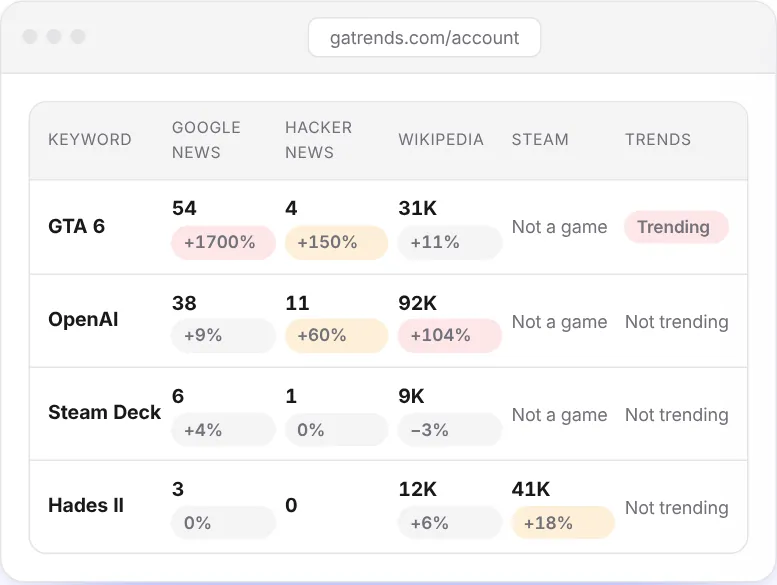
The default watch list of the public radar shows what a sensible starting set looks like: GTA 6, GTA 5 with its roleplay aliases (GTA RP, FiveM), Red Dead Redemption 2 with RedM, CS2, Fortnite, Silent Hill f, and a handful of technology names such as OpenAI, Anthropic, Nvidia, Apple, Tesla and Samsung. That mix is intentional. Gaming trends are rarely only about games: a graphics-card story, an AI tool or a platform policy change often moves a game’s audience more than a trailer does.
What an alert is, and how repeats are prevented
Every alert needs a real jump: a big ratio and a big absolute change together. Going from one article to two is a 100 percent increase and still not a spike. After an alert fires, the same thing stays quiet for a while, so you are not pinged again about a story you already know. The quiet periods are fixed per source.
| Source | Quiet period |
|---|---|
| Google News and Steam | At most one alert per keyword every 3 hours |
| Google Trends | Once a day per trending topic |
| Wikipedia | Once per day of data |
| Hacker News | Once per story |
| GitHub and Product Hunt | Once per repository or launch |
The public radar, which is the open version of the same engine and the one our own tools read, groups what it finds into six kinds: Spike, New topic (a name that suddenly appears across many headlines), Trending on Google, New on Steam (a title entering the top sellers or new releases for the first time), Hacker News and New on GitHub. The signal feed below shows several of them side by side.
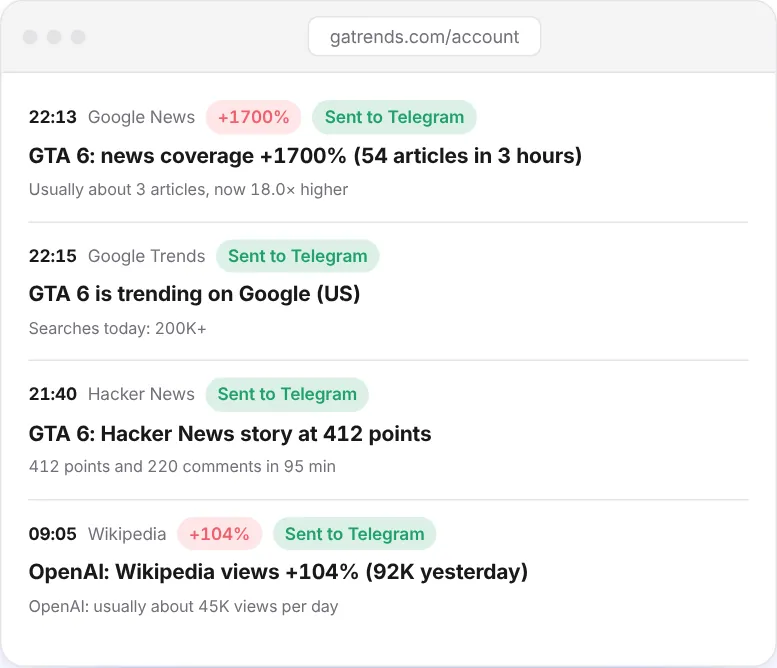
Telegram: the alert in your pocket
Telegram is available on every plan, including Free. You open the account settings, press the link button, and confirm in the Telegram app. If you ever want quiet, sending /stop to the bot pauses it. From that moment each alert arrives as a short message: the keyword, the source that moved, the size of the move, and links to the headlines that explain it. On Business you can connect several chats, which is how a newsroom sends alerts to a shared channel and a duty editor at the same time.
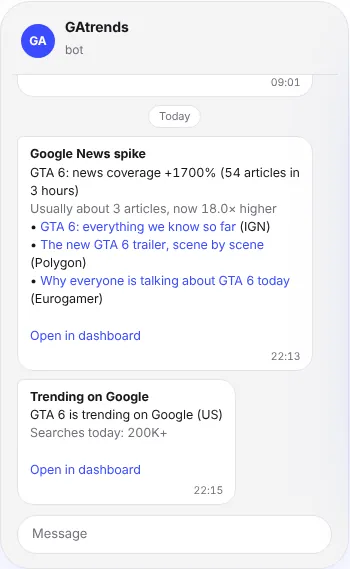
The message is deliberately compact. The goal is that you decide in five seconds whether to open the links, not that you read an essay on a lock screen. Tapping a headline opens the original article, so you always see the primary source instead of a summary of a summary.
Claude and ChatGPT: ask your radar a question
From the Pro plan upward you can connect the radar to Claude or ChatGPT. In your account you create a connector address (the settings page walks through it) and paste it into the connector settings of the assistant. After that, the assistant can call two tools: get_my_keywords, which lists your keywords with their current state and the numbers per source, and get_my_alerts, which returns your recent alerts with their headlines.
It sounds like a small feature until you use it. Instead of opening the dashboard you ask, “What moved in my list since yesterday, and which of those do we already have an article about?” The assistant reads the alerts, drafts a short brief and can propose an outline. Because the data is yours, the answers are about your keywords and not a generic list of whatever is popular. You can read more about the connection on the connect page and the reasoning behind it on the why page.
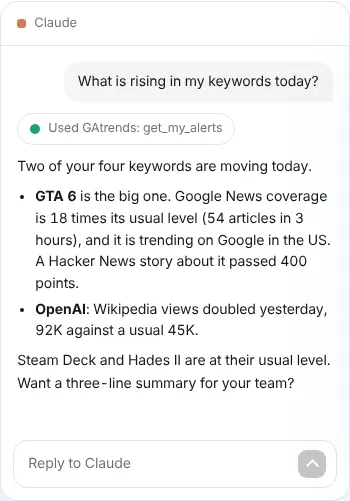
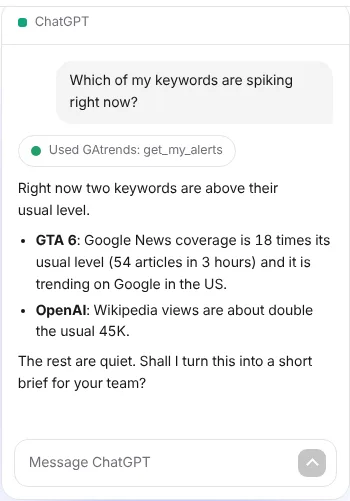
A note on safety, because it matters when you connect any tool to an assistant. The connector gives read access to your keywords and alerts. Headlines that come back from the internet are treated as data to analyse, never as instructions to follow, and you can remove access by deleting the key from the same settings page.
Webhooks, API and team seats (Business)
If you want to build something on top of the radar, the Business plan opens the machine interfaces.
The webhook posts every alert as JSON to an address you control. Every request carries an X-GAtrends-Signature header with a SHA-256 signature, so your server can verify that the message really came from GAtrends before it posts to Slack, Discord or an internal queue. The settings page has a test button that sends a sample event, which saves an afternoon of guessing.
The REST API is documented at gatrends.com/docs/api and described by an OpenAPI file at gatrends.com/openapi.json. Two endpoints cover most needs: /api/v1/keywords returns your keywords with their state and per-source figures, and /api/v1/alerts returns recent alerts. You authenticate with a bearer key that starts with gu_ and that you create in the account area.
Team seats: Business includes five seats. Invited colleagues see the owner’s workspace, so the whole desk shares one list of keywords instead of five different ones. CSV export comes with Pro and Business, which is useful if you want to chart a month of alerts in a spreadsheet or attach evidence to a report.
Anatomy of a spike: an illustrative walk-through
To show how the pieces fit, here is a worked example. The numbers are invented for the purpose of illustration and are not a record of a real event, but the sequence is exactly how the thresholds above behave.
Imagine you track a mid-sized shooter. On a normal Tuesday evening it has about 40,000 players on Steam, about 6 headlines in the three-hour window and about 8,000 Wikipedia views a day. At 19:00 the developer posts a surprise free weekend. By 19:30 the first outlets pick it up, and by 20:00 Steam shows 54,000 players. Let us read that against the rules.
- Steam. The usual number for that hour is 40,000. Fifty-four thousand is 1.35 times the usual and 14,000 higher. Both conditions of the Spike rule (at least 1.3 times and at least 1,500 higher) are met, so Steam is in the Spike state.
- Google News. Fifteen headlines against a usual six is 2.5 times and nine higher. That is above the Rising rule (1.5 times and two higher) but under the Spike rule of three times, so News is Rising for now.
- Wikipedia. Views are published per day, so the page still shows yesterday’s value and stays Normal. This is the slow source and the reason a single quiet source never cancels a loud one.
The overall status of the keyword is the highest among its sources, so the keyword is a Spike and the alert goes to Telegram with the Steam figures and the headlines. You open the three links, confirm that the free weekend is real, and publish a short post with the dates, the platforms and how to claim it. An hour later the headline count crosses three times the usual and News joins the spike. You are already published. For the next three hours the quiet period stops duplicates, and tomorrow the Wikipedia numbers arrive and confirm that curious readers followed the players.
That sequence also explains why the tool shows three numbers per source: now, usual and change. When you see 54,000 next to 40,000 you do not need a tutorial, and when you see a status you disagree with, you can see exactly which number caused it.
Why not just use Google Trends, or a search alert?
Google Trends is excellent at what it does, and the radar uses it as one of seven inputs. On its own it answers one question, which is what people search for, and it shows a curve that you have to interpret yourself. A search alert tells you when a new page mentions a phrase, which is useful but is the opposite of an early warning, because by the time a page exists the story has already started. Refreshing your favourite sites is the oldest method and the one that costs the most time.
GAtrends differs in three practical ways. It combines independent sources, so one loud source is a hint and two or three together usually mean real news. It measures distance from normal instead of raw counts, so a small topic can be a spike and a huge topic can be quiet. And it delivers the result where you already are, which is Telegram, an assistant, a webhook or an API, so that checking it does not become one more chore. The goal is fewer tabs, not more.
It is also deliberately narrow. It does not write articles for you, it does not scrape social networks, and it does not pretend that a number is a forecast. It tells you where attention is moving right now and leaves the editorial judgement to you, which is where it belongs.
Putting it to work: GTA VI launch week
Theory is cheap, so here is what the radar says as we write this. Our check at 18:00 UTC on November 12, 2026 showed GTA 6 with 63 news articles inside the three-hour window and Wikipedia views at about 63,000 a day against a usual level near 37,000. That is about 1.7 times the usual attention with a week to go, which puts the keyword in the Rising band and below the Spike threshold of twice the usual level. It also shows why statuses matter: the topic is huge in absolute terms, but the radar does not call every big topic a spike, only the ones that are moving away from their own normal.
The same snapshot showed a different kind of signal in the feed. A Google Trends entry for a GTA 6 controller appeared in the United Kingdom, a Nintendo Black Friday search jumped past twenty thousand searches in the United States, and a graphics-card modification story was climbing on Google and on tech sites. None of those is about the game itself, and all of them are the sort of adjacent demand that a gaming site can answer with a useful page. That is the real use of the tool: not “GTA 6 is popular”, which everyone knows, but “the people searching for GTA 6 also want to know about controllers, storage and deals this afternoon”.
Here is a practical setup for the week before a launch. Track the game by name with its aliases, then add the questions that surround every launch: the platform names, the storage and pre-load topics, the price and edition names, and the problems that appear on day one such as server status and crashes. Add one or two competitors that launch in the same window, because audience shifts between games are among the most useful things the radar shows. Then decide in advance what you will do at each status. At Rising, check the headlines and update an existing page. At Spike, publish the short answer first and the long guide after.
- Before the launch: watch for new topics around the game. Each one is a question nobody has answered well yet.
- Launch day: watch Steam and headline counts together. A jump in players with no headline jump usually means a problem or a promotion that the press has not noticed yet.
- The week after: watch Wikipedia and Google Trends for the long tail: modding, roleplay servers, performance tweaks and guides.
If you are following the launch with us, the GTA VI launch hub has the countdown and the confirmed facts, trending now shows what is moving on live servers and streams, and where to buy compares stores. For hardware questions that come with any big release, see our hardware news and the can I run it tool.
Who gets the most out of it
Editors and bloggers. The radar replaces the habit of refreshing five tabs. You keep a list of the games and topics you cover, and the first sign of movement reaches you with sources attached. The difference shows up in publishing time: being among the first twenty articles on a rising topic is a different traffic outcome from being among the last two hundred.
YouTubers and streamers. A video about a rising game is worth more on the day the game rises. The Wikipedia and Steam signals are especially useful here because they show real audience arriving, not only press coverage. A streamer can pick the game to stream next from a list ranked by distance from normal.
Community managers and studios. If you run a Discord server or an official channel for a game, a spike in headline volume about your game is the moment players start asking questions. Get the answer ready before the questions arrive. For studios, a spike on a competitor’s game is just as informative as one on your own.
Marketers and affiliates. Buying attention is cheaper before a trend peaks. If your keyword list includes the game, the platform and the accessories, an alert tells you when demand is about to be at its most expensive and when it is still cheap.
Investors and analysts who follow the industry. The tool does not give investment advice and we do not either. What it offers is a disciplined way to see attention move across games and hardware before reports are written.
People who just want to know. The Free plan with three keywords is enough to follow a favourite game, one console and one technology brand, with the alert arriving in Telegram.
Plans and prices
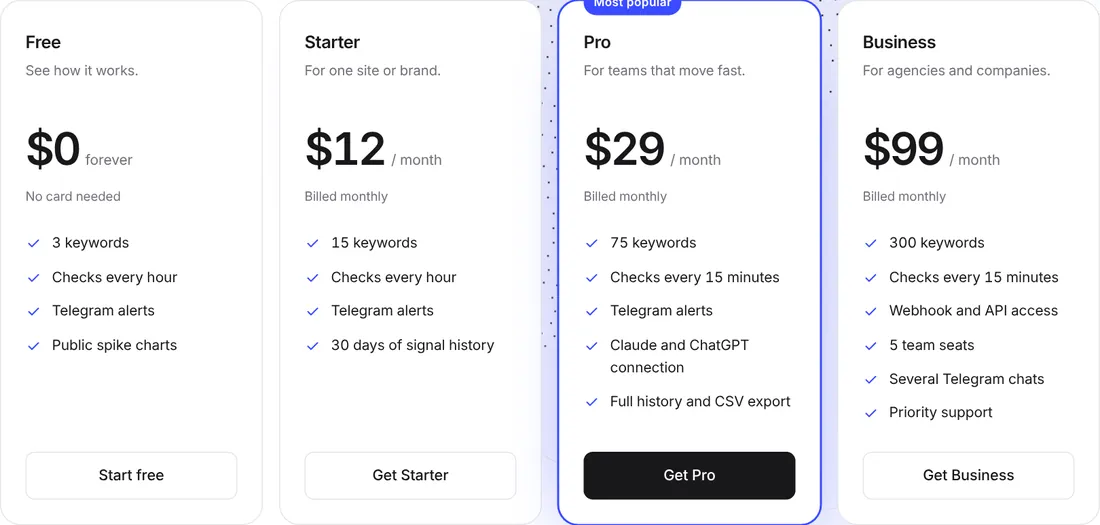
There are four self-service plans and an Enterprise option. All prices are in US dollars, taxes are calculated at checkout, and paid subscriptions renew until you cancel. The yearly option equals two free months. Paddle is the Merchant of Record and handles payment, invoices and returns, and there is a 14-day money-back guarantee on the first payment (see the refund policy).
| Free | Starter | Pro | Business | |
|---|---|---|---|---|
| Price per month | $0 | $12 ($120 a year) | $29 ($290 a year) | $99 ($990 a year) |
| Keywords | 3 | 15 | 75 | 300 |
| Google News check | Hourly | Hourly | 15 minutes | 15 minutes |
| Hacker News and Steam check | Hourly | Hourly | 30 minutes | 30 minutes |
| Signal history | 5 latest, 7 days | 30 days | Full, about 13 months | Full, about 13 months |
| Telegram chats | 1 | 1 | 1 | 5 |
| Claude and ChatGPT connection, CSV export | No | No | Yes | Yes |
| Webhook, API, team seats | No | No | No | Yes, 5 seats |
How to choose. Start on Free to see the radar work on one game. Move to Starter if you cover several games and want a month of history. Move to Pro when speed or the assistant connection matters: the faster headline check is the difference between a spike at 14:00 and a spike at 14:45. Business is for agencies and newsrooms that need the webhook, the API and shared seats. Enterprise, for large keyword volumes, custom sources and invoicing, is handled by email to support@gatrends.com. Everything is listed on the pricing page.
Honest limits: what GAtrends does not do
A review that only lists strengths is an advertisement, and we would rather you trust the tool than be surprised by it.
- It shows that attention moved, not why. The headlines attached to an alert are the explanation, but you still have to read them. Open the sources before you publish.
- Short or common words are noisy. A keyword such as “Switch” matches many things. A more specific name gives cleaner signals, and aliases help only when they are specific too.
- Events are not curves. Google Trends, GitHub and Product Hunt report presence, not ratios. They cover only top items, so most keywords stay quiet there, and that is expected.
- Language and region are limited. Headline counts use English-language news, Wikipedia means the English edition, and the trending lists cover the United States and the United Kingdom. Local trends in other countries will not show up.
- Steam only reacts to games on Steam. A console exclusive has no player count to read. For those, headlines and Wikipedia carry the signal.
- New keywords need a learning period. About three hours for headline and Steam signals on Pro and Business, about ten on Free and Starter.
- It is not financial or editorial advice. It is a detector. What you do with the signal is your decision.
Start in five minutes
- Open gatrends.com/signin and enter your email. You receive a sign-in link, no password needed.
- Add three keywords on the Free plan. A good first set is one game you cover, one platform or console and one technology brand. Add aliases.
- Link Telegram from the account settings and send yourself the test alert if you want to see the format.
- Wait through the learning period and read the Overview once a day. Count how many sources are Rising or Spike for each keyword.
- When you hit the keyword limit or want faster checks, compare plans on the pricing page.
Developers can go straight to the API documentation, and anyone curious about how the numbers are produced can read the sources page before creating an account. The privacy policy and terms are public, and for questions you can write to support@gatrends.com.
What to read next on Oggo
Trend data pairs well with the live pages on this site. The games hub lists every game we cover, the guides section holds our long how-to pages, release dates and the calendar show what is about to launch, free games tracks deals, and news collects the stories that matter. If you use a graphics card or a console for the games the radar surfaces, our hardware section covers prices and availability.
Frequently asked questions
FAQ
What is GAtrends?
GAtrends is a trend radar for games and technology. It watches seven public sources (Google News, Hacker News, Wikipedia, Steam, Google Trends, GitHub and Product Hunt), compares each reading with the usual level for your keywords and alerts you when something jumps.
Is there a free plan?
Yes. Free costs nothing, needs no card and tracks 3 keywords with hourly checks, Telegram alerts and public spike charts. Paid plans start at $12 a month, or $120 a year.
How fast will I see a spike?
Google Trends, GitHub and Product Hunt are checked every 15 minutes on every plan. Headlines are checked every hour on Free and Starter and every 15 minutes on Pro and Business; Steam and Hacker News every hour or every 30 minutes. News and Steam alerts need a learning period first, about 3 hours on Pro and Business and about 10 on Free and Starter.
Can I ask Claude or ChatGPT about my keywords?
Yes, from the Pro plan. You create a connector address in your account and add it to Claude or ChatGPT. The assistant can then read your keywords and your recent alerts through two tools, get_my_keywords and get_my_alerts.
Does it have an API or webhook?
Yes, on the Business plan. A signed webhook (the X-GAtrends-Signature header carries a SHA-256 signature) posts alerts to your server, and a REST API with a bearer key exposes your keywords and alerts. The documentation is at gatrends.com/docs/api and the OpenAPI file is at gatrends.com/openapi.json.
Can I get my money back?
There is a 14-day money-back guarantee on the first payment. Paddle is the Merchant of Record, so payments, invoices and returns go through Paddle, and you can cancel at any time and keep access until the end of the paid period.